# Introduction

HiveAuth is a fully decentralized solution for any application (web, desktop, or mobile) that wants to easily authenticate users without asking them for a password or private key.
When integrating HiveAuth protocol support, the Hive Authentication Services act as a bridge between any application and any Private Key Storage Application.

In this documentation, we will use:
* the name **HiveAuth** or the acronym **HAS** to refer to the Hive Authentication Services
* the acronym **APP** for applications
* the acronym **PKSA** for Private Key Storage Application
In most cases, the Private Key Storage Application (**PKSA**) is simply your preferred Hive Wallet application installed on your mobile, but it can also be a desktop application or a service running on a server (see [Service Mode PKSA](/tutorials/pksa-code-example/service-mode)).
Any application can rely on HiveAuth to authenticate users. It doesn't need to be a "Hive application", except if it plans to sign and broadcast transactions to the Hive Blockchain.
It can also work cross-chain because the HiveAuth infrastructure is "transactions agnostic". Therefore, one can easily imagine for example a Telos App "talking" with a Telos Wallet but authenticating and securing the connection with the help of a Hive account.
# Authentication
When a user wants to log into an application, they will provide their Hive username.

When the user hits the sign-in button, the **App** will send an authentication request to the **HAS** and ask the user to start their favorite Private Key Storage Application (**PKSA**), typically their favorite wallet application installed on their mobile (Hive Keychain for Mobile for example)

The user then opens their wallet and scans the QR code. Alternatively, if the application that the user wants to sign into is a mobile app, the latest can use deep linking and trigger the mobile device to install a wallet app or open it if already installed.
If the wallet stores the keys of the account that wants to log in, it will request approval or denial of the user's authentication request.
 If the user approve*s* the authentication request, the **APP** will be informed by the **HAS** that the user has successfully authenticated and that it can proceed with the user sign-in.
The **APP** has 100% certainty that the account exists and that whoever signs in owns the account's private keys.
Likewise, the user has explicitly identified and approved the application for further interaction.
At this moment, the application session and the users are now registered with the **HAS** and can communicate with each other through a secure encrypted channel.
# Signing and Broadcasting Transactions
Once an account is authenticated against an application, the latest can request the user to sign and broadcast transactions.
The user has the guarantee that the transaction requests come from the application with which he has just authenticated because both the app and the user have created a strong link through the authentication process and the **HAS** will filter out any transaction request from an unapproved application.
Similar to authentication, users will be able to approve or reject each transaction request that the approved applications will submit to them for signature.
# Why use Hive Authentication Services?
* **As a Hive user** You do not want to provide your Private Keys to Web, Desktop or Mobile Apps but still want to be able to use them. However, it happens that you store your Private Keys in a trusted application (which you may have audited), like Hive Keychain, and wish you didn't have to enter them elsewhere.
* **As a Hive Application developer** Implementing a secure solution for authentication (signing-in users), storing and protecting user's credentials, and broadcasting signed transactions to the Hive blockchain (providing access to user's private keys) can take significant effort. You must make sure to follow best practices and standards, and keep your implementation safe and up to date.\
By implementing Hive Authentication Services support into your application, all you have to do is to ask for a username, period!
* **As a Private Keys Storage Application developer** While you are good at securing the data you store, i.e. accounts Private Keys, implementing cross-processes, cross-applications and cross-platforms secure communication channels can be cumbersome and hard to maintain.\
Integrating HAS into your Private Keys Storage Application will instantly turn it into a 2FA solution for any HAS compatible Hive Applications.
HiveAuth is an out-of-the-box infrastructure that acts as middleware and facilitates the interactions between any applications and their users as long as they have a Hive account.
No longer will you have to put up with having a Facebook, Twitter or Gmail account, having to provide them with private information and being tracked for whatever you do.
# Support
Support for the Hive Authentication Services is provided on [Discord](https://discord.gg/hG4uFpDMhk)
# Protocol description
**HAS** protocol is an open protocol for connecting applications (**APP**) to wallets (**PKSA**).
The Hive Authentication Services (**HAS**) rely on the WebSocket protocol to exchange data between applications (**APP**) and the Private Keys Storage Application (**PKSA**) via persistent connections. The data can be passed in both directions as “payloads”, without breaking the connection and requiring additional HTTP requests.
The **APP** opens a WebSocket connection to the **HAS** endpoint and sends authentication and transactions requests to it.
The **PKSA** opens a WebSocket connection to the **HAS** endpoint, requests an encryption key from the server, registers the account(s) for which it will process requests, and wait for incoming authentication and transactions requests.
The **HAS** will queue requests from the **APP** and forward them to any newly or already connected **PKSA**. it will also relay back approval or refusal of the requests.
The dialogue between the different parties is done by means of JSON structured messages, each containing a `cmd` field that defines the nature of the message.
# Authentication
The initiator is the first peer who requests a connection, usually the **APP** reacting to a login request made by the **User**. The **APP** needs to authenticate the account that the **User** wants to log in with. The **User** has just to provide a Hive account name. No password or private key is required.

1. The **APP** sends an `auth_req` command to the **HAS**.
2. The **HAS** provides the **APP** with a request identifier (`uuid`) and a request expiration time (`auth_req_expire`)
3. The **APP** builds an authentication payload (`auth_payload`) which contains the received `uuid`, the account `name`, a session encryption key (`auth_key`) and the URL of the HAS `host` it is connected to.
The `auth_payload` will be shared with the **PKSA** offline using a QR code or deep linking.\
The **APP** asks the **User** to start its **PKSA** and scan the QR Code or it triggers the **PKSA** using deep linking when on mobile.
4. The **User** starts the **PKSA**.
**Note:** the PKSA can be started before or after the user starts the authentication process. It doesn't matter.
5. The **User** scans the QR code using the **PKSA**.
***Note:** This step is optional when the **APP** is a mobile application. The **PKSA** can retrieve the* `auth_payload` *from the deep link that triggered it.*
6. The **PKSA** asks the **HAS** for its public encryption key to securely register the account (`name`) found in the `auth_req_payload`.
7. The **HAS** provides its public key to the **PKSA** (`key_server)`
8. The **PKSA** asks the **HAS** to register the account in order to receive account-related pending requests.
9. The **HAS** validates against the blockchain that the account exists and that the **PKSA** stores a valid private key from the account
**Note:** The key ownership validation can be performed with any key. We recommend performing this process using the one that has the least permissions among those available.
10. Upon successful account validation, the **HAS** will forward the pending `auth_req` to the **PKSA**.
**Note:** The **PKSA** must match the `auth_payload.uuid` with the `auth_req.uuid` it receives to ensure it is processing the correct request.
11. The **PKSA** asks the **User** to approve or reject the authentication request.
12. The **User** approves or rejects the authentication request.
13. Depending on the user reaction:
1. if the **User** approves the authentication request, the **PKSA**:
* creates an `auth_expire and stores it`
* encrypts the `uuid` with the key (`key_app`) found in the `auth_payload`
* creates an `auth_ack_payload` with the above data (`auth_expire` and encrypted `uuid`) and sends it with an authentication request approval message (`auth_ack`) to the **HAS**.
2. If the user rejects the authentication request, the **PKSA** sends an authentication refusal (`auth_nack`) to the HAS.
***Note:** This operation is not depicted in the above diagram for clarity.*
14. The **HAS** forwards the authentication approval and its payload (`auth_ack`) or the authentication refusal (`auth_nack`) to the **APP**.
The encryption performed at step 13.1 ensures that a malicious actor operating a **HAS** cannot bypass the **PKSA** to approve an authentication request by itself.
Remember that the **HAS** doesn't have access to `key_app`. Therefore, by matching the decrypted `auth_ack_payload.uuid` using its encryption key (`key_app`) with the pending request `uuid` it received from the **HAS** with the `sign_wait` event, the **APP** has 100% certainty that the encryption process was made by the **PKSA**.
{% hint style="warning" %}
**Note:** The default **maximum delay** to approve an authentication request is **60 seconds**. The **HAS** will discard any pending request with a longer timeout.
{% endhint %}
# Transactions
## Broadcasting transactions

1. the **App** sends a `sign_req` command with an encrypted payload to the **HAS**.
2. the **HAS** provides the **App** with a request identifier (`uuid`) and its expiration time (`sign_req_expire`) in a `sign_wait` message.
3. \[Optional] the **App** shows information about the pending request to the user. It may also ask them to (re)start their **PKSA** to approve the transaction within the allowed delay.\
**Note:** the PKSA can be started before or after the transaction request is issued. It doesn't matter.
4. the **HAS** then forwards the `sign_req` command to the **PKSA**
5. the **PKSA** checks if it can decrypt the payload and prompts the **User** to approve or reject the transaction
6. the user approves or refuses the transaction.
7. If the **User** approves the transaction, the **PKSA** signs it and broadcasts it to the blockchain.
8. If the transaction broadcast is successful, the **PKSA** sends a `sign_ack` to the **HAS** with the blockchain transaction ID (`txID`)
9. the **HAS** forwards the `sign_ack` message with the blockchain transaction ID (`txID`) to the **App**.
{% hint style="info" %}
*For clarity, transaction refusal is not depicted in the above diagram.* The flow would be the same but with a `sign_nack` message.
{% endhint %}
## Signing Transactions
An **APP** may want to manage the sending of the transaction to the blockchain itself. In this case, it will ask **PKSA** to only sign the transaction without broadcasting it.
Here is the diagram describing the process:
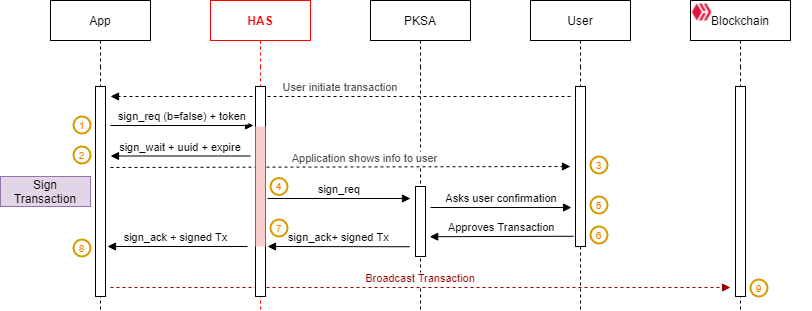
1. the **App** sends a `sign_req` command with an encrypted payload to the **HAS**.
2. the **HAS** provides the **App** with a request identifier (`uuid`) and its expiration time (`sign_req_expire`) in a `sign_wait` message.
3. \[Optional] the **App** shows information about the pending request to the user. It may also ask them to (re)start their **PKSA** to approve the transaction within the allowed delay.\
**Note:** the PKSA can be started before or after the transaction request is issued. It doesn't matter.
4. the **HAS** then forwards the `sign_req` command to the **PKSA**
5. the **PKSA** checks if it can decrypt the payload and prompts the **User** to approve or reject the transaction
6. the **User** approves (or rejects) the transaction.\
***Note:** For clarity, transaction refusal is not depicted in the above diagram.* The flow would be the same but with a `sign_nack` message.
7. the **PKSA** signs the transaction the **PKSA** sends a `sign_ack` to the **HAS** with the `signed_transaction`
8. the **HAS** sends a `sign_ack` command to the **App** with the `signed_transaction`.
9. It's now up to the **App** to broadcast the signed transaction to the blockchain.
{% hint style="info" %}
*For clarity, transaction refusal is not depicted in the above diagram.* The flow would be the same but with a `sign_nack` message.
{% endhint %}
{% hint style="danger" %}
**Note:** The default **maximum delay** to approve a transaction request is **60 seconds.** The **HAS** will discard any pending request with a longer timeout.
{% endhint %}
# Challenge
Sometimes, an **APP** may want to validate an account by asking it to sign a predefined text string (challenge) with one of its keys.
This can be useful if the **APP** uses a front-end/back-end infrastructure. The **APP** front-end asks the **PKSA** to sign a message with one of the account's keys, then send it to its back-end when it makes API calls related to the account. The back-end can then validate the signed challenge against the account public key.

1. the **APP** sends a `challenge_req` command to the **HAS** with a valid `auth_token`.
2. the **HAS** provides the **APP** with a request identifier (`uuid`) and its expiration time (`expire`) in a `challenge_wait` message.
3. \[Optional] the **APP** shows information about the pending request to the user. It may also ask them to (re)start their **PKSA** to approve the challenge signing within the allowed delay.\
**Note:** the **PKSA** can be started before or after the challenge request is issued. It doesn't matter.
4. the **HAS** then forwards the `challenge_req` command to the **PKSA**
5. the **PKSA** checks if it can decrypt the payload and prompts the user to approve or reject the challenge
6. the user approves or rejects the challenge.
7. the **PKSA** signs the challenge and sends a `challenge_ack` to the **HAS**
8. the **HAS** forwards the `challenge_ack` message to the **APP**.
{% hint style="info" %}
*For clarity, transaction refusal is not depicted in the above diagram.* The flow would be the same but with a `sign_nack` message.
{% endhint %}
# HAS for Applications
This section describes the HAS protocol specification for communication between an Application (**APP**) and the Hive Authentication Services (**HAS)** infrastructure.
# Connection
The first thing an APP needs to do is to open a WebSocket connection with a **HAS** server. Once connected, the **HAS** will send a `connected` message with additional information.
```
{
cmd: "connected",
timeout: number,
version: string,
protocol: number
}
```
{% tabs %}
{% tab title="Properties" %}
* **`timeout`**: delay (in seconds) before the server considers requests to be expired. The default value is 60 seconds.
* **`version`**: HAS code version
* **`protocol`**: HAS protocol version
{% endtab %}
{% endtabs %}
{% hint style="warning" %}
An application should decline to connect to a HAS infrastructure whose protocol version is greater than the one it supports.
{% endhint %}
# Encryption key (auth\_key)
To secure the authentication process, the data exchanged between the **APP** and the **PKSA** will be encrypted using an encryption key (`auth_key`). By encrypting these data, the **HAS** will be unaware of what's going on between the **APP** and the **PKSA** and unable to tamper with the authentication process.
Before initiating the authentication process, the **APP** must create an `auth_key` for each account it manages.
The `auth_key` can be any **string**. However, we recommend using a [uuid](https://en.wikipedia.org/wiki/Universally_unique_identifier) each time you generate a new `auth_key` to strengthen security.
{% hint style="info" %}
This `auth_key` should be stored by the **APP** if it plans to perform transactions later.
{% endhint %}
{% hint style="info" %}
Each account managed by the APP should use a different `auth_key`.
{% endhint %}
{% hint style="info" %}
The **APP** should create a **new** `auth_key` **each time it authenticates** **an account** and should never reuse it for another authentication.
{% endhint %}
For the **PKSA** to be able to decrypt the payload sent to it by the **APP**, the **APP** will have to share it with the **PKSA**. This can be done in two ways:
1. by embedding it in a QR code that the **PKSA** mobile app will scan
2. by encrypting it and embedding it in the `auth_req` authentication payload when running your own **PKSA** in [Service Mode](/tutorials/pksa-code-example/service-mode)
# Authentication
When a user starts an **APP**, the first thing the **APP** needs to do is authenticate the user, especially if the **APP** wants to interact later with the Hive blockchain.
Usually, this is done by entering a username and password and matching it against similar data stored somewhere.
Hive Authentications Services enables applications to authenticate their users by simply providing a username and relieving the applications from storing additional credentials data.
The credentials are stored in the **PKSA** local storage and act as a Two-Factor Authentication (2FA) provider.
The users only need to trust one **PKSA**, where they safely store their private keys. They no more will be required to provide any key to any **HAS** enabled application. Likewise, they are guaranteed that their keys will never leave the **PKSA**.
After the user has provided the **APP** with their account name, the **APP** will perform the authentication process.
# Authentication request
Before sending its request, the **APP** must create an "authentication request data" object (`auth_req_data`) it will send to the **PKSA**
### auth\_req\_data
```javascript
{
app: {
name: string
description: string = undefined
icon: string = undefined
},
challenge: object = undefined
token: string = undefined // DEPRECATED - protocol < 1 only
}
```
{% tabs %}
{% tab title="Properties" %}
* **`app`**: an object describing the application
* **`name`**: short name of the app (ex: "myapp")
* **`description`**: *(optional)* description of the app (ex: "My Hive Application")
* **`icon`**: *(optional)* URL to retrieve the application icon (ex: "")
* **`challenge`**: *(optional)* a `challenge_data` object that the app can pass to the PKSA for signing (see [Challenge request](/developer-documentation/has-for-applications/challenge/challenge-request))
If the user approve*s* the authentication request, the **APP** will be informed by the **HAS** that the user has successfully authenticated and that it can proceed with the user sign-in.
The **APP** has 100% certainty that the account exists and that whoever signs in owns the account's private keys.
Likewise, the user has explicitly identified and approved the application for further interaction.
At this moment, the application session and the users are now registered with the **HAS** and can communicate with each other through a secure encrypted channel.
# Signing and Broadcasting Transactions
Once an account is authenticated against an application, the latest can request the user to sign and broadcast transactions.
The user has the guarantee that the transaction requests come from the application with which he has just authenticated because both the app and the user have created a strong link through the authentication process and the **HAS** will filter out any transaction request from an unapproved application.
Similar to authentication, users will be able to approve or reject each transaction request that the approved applications will submit to them for signature.
# Why use Hive Authentication Services?
* **As a Hive user** You do not want to provide your Private Keys to Web, Desktop or Mobile Apps but still want to be able to use them. However, it happens that you store your Private Keys in a trusted application (which you may have audited), like Hive Keychain, and wish you didn't have to enter them elsewhere.
* **As a Hive Application developer** Implementing a secure solution for authentication (signing-in users), storing and protecting user's credentials, and broadcasting signed transactions to the Hive blockchain (providing access to user's private keys) can take significant effort. You must make sure to follow best practices and standards, and keep your implementation safe and up to date.\
By implementing Hive Authentication Services support into your application, all you have to do is to ask for a username, period!
* **As a Private Keys Storage Application developer** While you are good at securing the data you store, i.e. accounts Private Keys, implementing cross-processes, cross-applications and cross-platforms secure communication channels can be cumbersome and hard to maintain.\
Integrating HAS into your Private Keys Storage Application will instantly turn it into a 2FA solution for any HAS compatible Hive Applications.
HiveAuth is an out-of-the-box infrastructure that acts as middleware and facilitates the interactions between any applications and their users as long as they have a Hive account.
No longer will you have to put up with having a Facebook, Twitter or Gmail account, having to provide them with private information and being tracked for whatever you do.
# Support
Support for the Hive Authentication Services is provided on [Discord](https://discord.gg/hG4uFpDMhk)
# Protocol description
**HAS** protocol is an open protocol for connecting applications (**APP**) to wallets (**PKSA**).
The Hive Authentication Services (**HAS**) rely on the WebSocket protocol to exchange data between applications (**APP**) and the Private Keys Storage Application (**PKSA**) via persistent connections. The data can be passed in both directions as “payloads”, without breaking the connection and requiring additional HTTP requests.
The **APP** opens a WebSocket connection to the **HAS** endpoint and sends authentication and transactions requests to it.
The **PKSA** opens a WebSocket connection to the **HAS** endpoint, requests an encryption key from the server, registers the account(s) for which it will process requests, and wait for incoming authentication and transactions requests.
The **HAS** will queue requests from the **APP** and forward them to any newly or already connected **PKSA**. it will also relay back approval or refusal of the requests.
The dialogue between the different parties is done by means of JSON structured messages, each containing a `cmd` field that defines the nature of the message.
# Authentication
The initiator is the first peer who requests a connection, usually the **APP** reacting to a login request made by the **User**. The **APP** needs to authenticate the account that the **User** wants to log in with. The **User** has just to provide a Hive account name. No password or private key is required.

1. The **APP** sends an `auth_req` command to the **HAS**.
2. The **HAS** provides the **APP** with a request identifier (`uuid`) and a request expiration time (`auth_req_expire`)
3. The **APP** builds an authentication payload (`auth_payload`) which contains the received `uuid`, the account `name`, a session encryption key (`auth_key`) and the URL of the HAS `host` it is connected to.
The `auth_payload` will be shared with the **PKSA** offline using a QR code or deep linking.\
The **APP** asks the **User** to start its **PKSA** and scan the QR Code or it triggers the **PKSA** using deep linking when on mobile.
4. The **User** starts the **PKSA**.
**Note:** the PKSA can be started before or after the user starts the authentication process. It doesn't matter.
5. The **User** scans the QR code using the **PKSA**.
***Note:** This step is optional when the **APP** is a mobile application. The **PKSA** can retrieve the* `auth_payload` *from the deep link that triggered it.*
6. The **PKSA** asks the **HAS** for its public encryption key to securely register the account (`name`) found in the `auth_req_payload`.
7. The **HAS** provides its public key to the **PKSA** (`key_server)`
8. The **PKSA** asks the **HAS** to register the account in order to receive account-related pending requests.
9. The **HAS** validates against the blockchain that the account exists and that the **PKSA** stores a valid private key from the account
**Note:** The key ownership validation can be performed with any key. We recommend performing this process using the one that has the least permissions among those available.
10. Upon successful account validation, the **HAS** will forward the pending `auth_req` to the **PKSA**.
**Note:** The **PKSA** must match the `auth_payload.uuid` with the `auth_req.uuid` it receives to ensure it is processing the correct request.
11. The **PKSA** asks the **User** to approve or reject the authentication request.
12. The **User** approves or rejects the authentication request.
13. Depending on the user reaction:
1. if the **User** approves the authentication request, the **PKSA**:
* creates an `auth_expire and stores it`
* encrypts the `uuid` with the key (`key_app`) found in the `auth_payload`
* creates an `auth_ack_payload` with the above data (`auth_expire` and encrypted `uuid`) and sends it with an authentication request approval message (`auth_ack`) to the **HAS**.
2. If the user rejects the authentication request, the **PKSA** sends an authentication refusal (`auth_nack`) to the HAS.
***Note:** This operation is not depicted in the above diagram for clarity.*
14. The **HAS** forwards the authentication approval and its payload (`auth_ack`) or the authentication refusal (`auth_nack`) to the **APP**.
The encryption performed at step 13.1 ensures that a malicious actor operating a **HAS** cannot bypass the **PKSA** to approve an authentication request by itself.
Remember that the **HAS** doesn't have access to `key_app`. Therefore, by matching the decrypted `auth_ack_payload.uuid` using its encryption key (`key_app`) with the pending request `uuid` it received from the **HAS** with the `sign_wait` event, the **APP** has 100% certainty that the encryption process was made by the **PKSA**.
{% hint style="warning" %}
**Note:** The default **maximum delay** to approve an authentication request is **60 seconds**. The **HAS** will discard any pending request with a longer timeout.
{% endhint %}
# Transactions
## Broadcasting transactions

1. the **App** sends a `sign_req` command with an encrypted payload to the **HAS**.
2. the **HAS** provides the **App** with a request identifier (`uuid`) and its expiration time (`sign_req_expire`) in a `sign_wait` message.
3. \[Optional] the **App** shows information about the pending request to the user. It may also ask them to (re)start their **PKSA** to approve the transaction within the allowed delay.\
**Note:** the PKSA can be started before or after the transaction request is issued. It doesn't matter.
4. the **HAS** then forwards the `sign_req` command to the **PKSA**
5. the **PKSA** checks if it can decrypt the payload and prompts the **User** to approve or reject the transaction
6. the user approves or refuses the transaction.
7. If the **User** approves the transaction, the **PKSA** signs it and broadcasts it to the blockchain.
8. If the transaction broadcast is successful, the **PKSA** sends a `sign_ack` to the **HAS** with the blockchain transaction ID (`txID`)
9. the **HAS** forwards the `sign_ack` message with the blockchain transaction ID (`txID`) to the **App**.
{% hint style="info" %}
*For clarity, transaction refusal is not depicted in the above diagram.* The flow would be the same but with a `sign_nack` message.
{% endhint %}
## Signing Transactions
An **APP** may want to manage the sending of the transaction to the blockchain itself. In this case, it will ask **PKSA** to only sign the transaction without broadcasting it.
Here is the diagram describing the process:

1. the **App** sends a `sign_req` command with an encrypted payload to the **HAS**.
2. the **HAS** provides the **App** with a request identifier (`uuid`) and its expiration time (`sign_req_expire`) in a `sign_wait` message.
3. \[Optional] the **App** shows information about the pending request to the user. It may also ask them to (re)start their **PKSA** to approve the transaction within the allowed delay.\
**Note:** the PKSA can be started before or after the transaction request is issued. It doesn't matter.
4. the **HAS** then forwards the `sign_req` command to the **PKSA**
5. the **PKSA** checks if it can decrypt the payload and prompts the **User** to approve or reject the transaction
6. the **User** approves (or rejects) the transaction.\
***Note:** For clarity, transaction refusal is not depicted in the above diagram.* The flow would be the same but with a `sign_nack` message.
7. the **PKSA** signs the transaction the **PKSA** sends a `sign_ack` to the **HAS** with the `signed_transaction`
8. the **HAS** sends a `sign_ack` command to the **App** with the `signed_transaction`.
9. It's now up to the **App** to broadcast the signed transaction to the blockchain.
{% hint style="info" %}
*For clarity, transaction refusal is not depicted in the above diagram.* The flow would be the same but with a `sign_nack` message.
{% endhint %}
{% hint style="danger" %}
**Note:** The default **maximum delay** to approve a transaction request is **60 seconds.** The **HAS** will discard any pending request with a longer timeout.
{% endhint %}
# Challenge
Sometimes, an **APP** may want to validate an account by asking it to sign a predefined text string (challenge) with one of its keys.
This can be useful if the **APP** uses a front-end/back-end infrastructure. The **APP** front-end asks the **PKSA** to sign a message with one of the account's keys, then send it to its back-end when it makes API calls related to the account. The back-end can then validate the signed challenge against the account public key.

1. the **APP** sends a `challenge_req` command to the **HAS** with a valid `auth_token`.
2. the **HAS** provides the **APP** with a request identifier (`uuid`) and its expiration time (`expire`) in a `challenge_wait` message.
3. \[Optional] the **APP** shows information about the pending request to the user. It may also ask them to (re)start their **PKSA** to approve the challenge signing within the allowed delay.\
**Note:** the **PKSA** can be started before or after the challenge request is issued. It doesn't matter.
4. the **HAS** then forwards the `challenge_req` command to the **PKSA**
5. the **PKSA** checks if it can decrypt the payload and prompts the user to approve or reject the challenge
6. the user approves or rejects the challenge.
7. the **PKSA** signs the challenge and sends a `challenge_ack` to the **HAS**
8. the **HAS** forwards the `challenge_ack` message to the **APP**.
{% hint style="info" %}
*For clarity, transaction refusal is not depicted in the above diagram.* The flow would be the same but with a `sign_nack` message.
{% endhint %}
# HAS for Applications
This section describes the HAS protocol specification for communication between an Application (**APP**) and the Hive Authentication Services (**HAS)** infrastructure.
# Connection
The first thing an APP needs to do is to open a WebSocket connection with a **HAS** server. Once connected, the **HAS** will send a `connected` message with additional information.
```
{
cmd: "connected",
timeout: number,
version: string,
protocol: number
}
```
{% tabs %}
{% tab title="Properties" %}
* **`timeout`**: delay (in seconds) before the server considers requests to be expired. The default value is 60 seconds.
* **`version`**: HAS code version
* **`protocol`**: HAS protocol version
{% endtab %}
{% endtabs %}
{% hint style="warning" %}
An application should decline to connect to a HAS infrastructure whose protocol version is greater than the one it supports.
{% endhint %}
# Encryption key (auth\_key)
To secure the authentication process, the data exchanged between the **APP** and the **PKSA** will be encrypted using an encryption key (`auth_key`). By encrypting these data, the **HAS** will be unaware of what's going on between the **APP** and the **PKSA** and unable to tamper with the authentication process.
Before initiating the authentication process, the **APP** must create an `auth_key` for each account it manages.
The `auth_key` can be any **string**. However, we recommend using a [uuid](https://en.wikipedia.org/wiki/Universally_unique_identifier) each time you generate a new `auth_key` to strengthen security.
{% hint style="info" %}
This `auth_key` should be stored by the **APP** if it plans to perform transactions later.
{% endhint %}
{% hint style="info" %}
Each account managed by the APP should use a different `auth_key`.
{% endhint %}
{% hint style="info" %}
The **APP** should create a **new** `auth_key` **each time it authenticates** **an account** and should never reuse it for another authentication.
{% endhint %}
For the **PKSA** to be able to decrypt the payload sent to it by the **APP**, the **APP** will have to share it with the **PKSA**. This can be done in two ways:
1. by embedding it in a QR code that the **PKSA** mobile app will scan
2. by encrypting it and embedding it in the `auth_req` authentication payload when running your own **PKSA** in [Service Mode](/tutorials/pksa-code-example/service-mode)
# Authentication
When a user starts an **APP**, the first thing the **APP** needs to do is authenticate the user, especially if the **APP** wants to interact later with the Hive blockchain.
Usually, this is done by entering a username and password and matching it against similar data stored somewhere.
Hive Authentications Services enables applications to authenticate their users by simply providing a username and relieving the applications from storing additional credentials data.
The credentials are stored in the **PKSA** local storage and act as a Two-Factor Authentication (2FA) provider.
The users only need to trust one **PKSA**, where they safely store their private keys. They no more will be required to provide any key to any **HAS** enabled application. Likewise, they are guaranteed that their keys will never leave the **PKSA**.
After the user has provided the **APP** with their account name, the **APP** will perform the authentication process.
# Authentication request
Before sending its request, the **APP** must create an "authentication request data" object (`auth_req_data`) it will send to the **PKSA**
### auth\_req\_data
```javascript
{
app: {
name: string
description: string = undefined
icon: string = undefined
},
challenge: object = undefined
token: string = undefined // DEPRECATED - protocol < 1 only
}
```
{% tabs %}
{% tab title="Properties" %}
* **`app`**: an object describing the application
* **`name`**: short name of the app (ex: "myapp")
* **`description`**: *(optional)* description of the app (ex: "My Hive Application")
* **`icon`**: *(optional)* URL to retrieve the application icon (ex: "")
* **`challenge`**: *(optional)* a `challenge_data` object that the app can pass to the PKSA for signing (see [Challenge request](/developer-documentation/has-for-applications/challenge/challenge-request))
* **`token`**: *(optional)* a valid session token previously received from the **PKSA - *****Deprecated since protocol V1***
{% endtab %}
{% endtabs %}
{% hint style="info" %}
Sending a challenge to the **PKSA** with an auth\_req enables the **APP** to perform both an authentication and a challenge signing in one round trip.
{% endhint %}
The **APP** must then encrypt the `auth_req_data` object using the `auth_key` (see [Encryption Key](/developer-documentation/has-for-applications/encryption-key-auth_key))
Finally, the **APP** sends its authentication request (`auth_req`) to the **HAS** using the following message:
### auth\_req
```javascript
{
cmd: "auth_req"
account: string
data: string
}
```
{% tabs %}
{% tab title="Properties" %}
* **`account`**: the Hive account name that the application wants to authenticate
* **`data`**: the Base64 representation of an encrypted `auth_req_data` object
{% endtab %}
{% endtabs %}
{% hint style="info" %}
Providing an existing `token` with the `auth_req` simplifies the authentication process. Indeed, if a **PKSA** stores the token and confirms its validity, it is no longer required to scan a QR code because the **PKSA** already has the associated `auth_key`.
{% endhint %}
{% hint style="info" %}
When using a **PKSA** running in [Service Mode](/tutorials/pksa-code-example/service-mode), the **APP** must add the `auth_key` property to the `auh_req` it sends to the **HAS** server.
The `auth_key` must be encrypted with the encryption secret (auth\_req\_secret) it shares with the **PKSA** service.
example:
`{` \
`cmd: "auth_req",` \
`account: "username",` \
`data:`` `*`{{encrypted_data_base64}}`*`,`\
`auth_key: CryptoJS.Encrypt(auth_key, auth_req_secret)` \
`}`
{% endhint %}
The **HAS** will reply with an auth\_wait message
### auth\_wait
```javascript
{
cmd: "auth_wait"
uuid: string
expire: number
account: string
}
```
{% tabs %}
{% tab title="Properties" %}
* **`uuid`**: a unique identifier given by the **HAS** to the request
* **`expire`**: UNIX timestamp when the authentication request will expire
* **`account`**: account doing the authentication request
{% endtab %}
{% endtabs %}
# Authentication payload
Once the **APP** receives the request confirmation (`auth_wait` and `uuid`), it should tell the user to start its **PKSA** to approve or reject the authentication request before the request expires.
The application must provide the user with out-of-band data. These data will be read by the **PKSA** in order to know which **HAS** server to connect to and to privately share an authentication key (`auth_key`) used to encrypt payloads.
This can be done by providing the user with a deep link or QR code representation of that deep link.
To create the deep link:
1\. Create an `auth_payload` object:
### auth\_payload
```javascript
{
account: string
uuid: string,
key: string,
host: string
}
```
{% tabs %}
{% tab title="Properties" %}
* **`account`**: the username of the account performing the authentication.
* **`uuid`**: the request identifier received with the `auth_wait` reply.
* **`key`**: the app-generated `auth_key` (see [Encryption Key](/developer-documentation/has-for-applications/encryption-key-auth_key))
* **`host`**: URL of the **HAS** server the **APP** is connected to (ex: "wss\://has.hiveauth.com")
{% endtab %}
{% endtabs %}
2\. Convert the `auth_payload` object to a base64 string (`auth_payload_base64`)
The URI for the deep link will be:\
`has://auth_req/{{auth_payload_base64}}`
**Example:**
The following auth\_payload
```
{
"account":"arcange",
"uuid":"9b0e2dc3-f574-4766-abdd-c429dce11284",
"key":"03f63469-5a35-47cb-a6b4-e8c4d3144cf9",
"host":"wss://has.hiveauth.com"
}
```
will generate the following URI:
`has://auth_req/`eyJhY2NvdW50IjoiYXJjYW5nZSIsInV1aWQiOiI5YjBlMmRjMy1mNTc0LTQ3NjYtYWJkZC1jNDI5ZGNlMTEyODQiLCJrZXkiOiIwM2Y2MzQ2OS01YTM1LTQ3Y2ItYTZiNC1lOGM0ZDMxNDRjZjkiLCJob3N0Ijoid3NzOi8vaGFzLmhpdmVhdXRoLmNvbSJ9
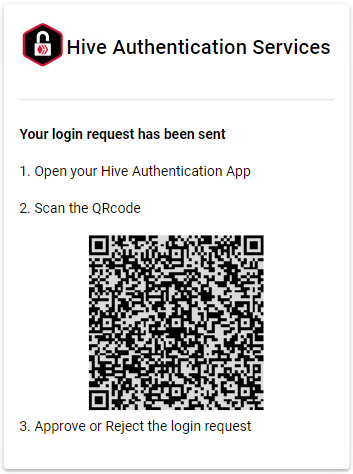
and will produce the following QR code
# Authentication approval
If the user approves the authentication request with its **PKSA**, the latest will send an `auth_ack` message to the **HAS** with an access token and its expiration.
When the **HAS** will receive the user approval from its **PKSA**, it will forward it to the **APP** which will receive the following message
### auth\_ack
```javascript
{
cmd: "auth_ack"
uuid: string
data: string
}
```
{% tabs %}
{% tab title="Properties" %}
* **`uuid`**: the request identifier
* **`data`**: `auth_ack_data` encrypted with the `auth_key` and converted to Base64
{% endtab %}
{% endtabs %}
The **APP** must validate the received `uuid` against the request ID (`uuid`) that it received from the **HAS** in the `auth_wait` message and ignore the `auth_ack` message if they don't match.
The **APP** must decrypt the `auth_ack_data` object using the encryption key previously shared with the **PKSA** (`auth_key`). If the **APP** cannot decrypt and parse `auth_ack_data`, the **APP** must ignore the `auth_ack` message.
> This `auth_ack_data` encryption/decryption process has been put in place to ensure that a malicious actor operating a **HAS** cannot bypass the **PKSA** to approve an authentication request.
>
> As the encryption key has been provided off-line to the **PKSA**, it is unknown to the **HAS,** which therefore cannot decrypt, tamper then (re-)encrypt any data exchanged between the **APP** and the **PKSA**.
The structure of the `auth_ack_data` is:
### auth\_ack\_data
```javascript
{
expire: number
challenge_data: object = undefined
token: string // DEPRECATED - protocol < 1.0 only
}
```
{% tabs %}
{% tab title="Properties" %}
* **`expire`**: UNIX timestamp when the authentication will expire
* **`challenge_data`**: *optional* - if the **APP** provided a `challenge` object with the `auth_req` sent to the **PKSA**, it contains a `challenge_ack_data` object (see [Challenge approval](/developer-documentation/has-for-applications/challenge/challenge-approval)).
* **`token`**: session token - ***Deprecated since protocol v1.0***
{% endtab %}
{% endtabs %}
The application should store the `auth_key` it used to authenticate. This `auth_key` can be used with each subsequent request. This saves the user from having to re-authenticate with that same **PKSA** until `auth_key` has expired.
It is up to the **APP** to reuse the `auth_key` for as long as it is valid or to shorten its life by reinitiating a new authentication process.
When the **auth\_key** expires, any related transaction requests will be rejected.
# Authentication refusal
If the user doesn't approve the authentication request, the **PKSA** will send a refusal message to the **HAS**. The **HAS** will then forward the following message to the **APP**:
### auth\_nack
```
{
cmd: "auth_nack",
uuid: string,
data: string
}
```
{% tabs %}
{% tab title="Properties" %}
* **`uuid`**: the request identifier
* **`data`**: the `uuid` encrypted with `auth_key` and converted to Base64
{% endtab %}
{% endtabs %}
{% hint style="warning" %}
The `data` can be decrypted by the **APP** using the `auth_key` to ensure the `auth_nack` message comes from a **PKSA** it has previously shared the `auth_key` with. This prevents a malicious actor operating a **HAS** server from faking requests' refusal.
{% endhint %}
# Errors
If for any reason the **PKSA** fails to process the authentication request, it can send an error message to the **HAS** that will forward it to the **APP**. The same applies if the error is generated by the **HAS**.
In both cases, the **APP** will receive the following message:
### auth\_err
```
{
cmd: "auth_err",
uuid: string,
error: string
}
```
{% tabs %}
{% tab title="Properties" %}
* **`uuid`**: the request identifier
* **`error`**: an error message encrypted with the `auth_key`
{% endtab %}
{% endtabs %}
# Expiration
It may come that the **APP** never receives any reply to its request from the **HAS**.
There can be many reasons for this, like users not starting their **PKSA** or not approving or denying authentication requests they receive.
The **APP** should monitor requests' expiration against the `expire` timeout provided in the `auth_wait` message. They should abort the authentication process and discard pending requests as well as any related reply they may receive.
# Transactions
Once the user is authenticated, they can start to transact with the Hive blockchain through the **APP**.
The **APP** can either request the **PKSA** to only sign transactions (in order to broadcast the transactions by itself to the blockchain) or ask the **PKSA** to sign and directly broadcast the signed transaction to the blockchain.
# Transaction request
The **APP** can request the **PKSA** to sign and/or broadcast a transaction.
Before sending its request, the **APP** must create a "sign request data" object (`sign_req_data`) it will send to the **PKSA**
### sign\_req\_data
```javascript
{
key_type: string
ops: Array
broadcast: boolean
nonce: number
}
```
{% tabs %}
{% tab title="Properties" %}
* **`key_type`**: the key type required to sign the transactions. It can be one of `posting`|`active`
* **`ops`**: an array of operations objects (see [Hive API doc](https://developers.hive.io/apidefinitions/#condenser_api.broadcast_transaction) for more info)
* **`broadcast`**: `true` if the **PKSA** must broadcast the transaction to the blockchain. `false` if the **PKSA** must return a signed transaction but not broadcast it to the blockchain.
* **`nonce`**: current UNIX time in ms (`Date.now()` in Javascript). If a transaction request ever fails, do **NOT** reuse the `sign_req_data` object before **first updating the nonce**!
{% endtab %}
{% endtabs %}
The **APP** must then encrypt the `sign_req_data` object using the encryption key previously shared with the **PKSA** (`auth_key`). By encrypting the `sign_req_data` object, the **HAS** will be unaware of what's going on between the app and the PKSA and unable to tamper with the sign request process.
Finally, the **APP** sends its request to the **HAS** using the following message:
### sign\_req
```
{
cmd: "sign_req"
account: string
data: string
token: string // DEPRECATED - protocol < 1 only
}
```
{% tabs %}
{% tab title="Properties" %}
* **`account`**: the Hive account name that must sign the transactions
* **`data`**: the Base64 representation of an encrypted `sign_req_data` object
* **`token`**: the authentication token - ***Deprecated since protocol V1***
{% endtab %}
{% endtabs %}
The **HAS** will reply with a `sign_wait` message:
### sign\_wait
```javascript
{
cmd: "sign_wait",
uuid: string,
expire: number
}
```
{% tabs %}
{% tab title="Properties" %}
* **`uuid`**: a unique identifier given by the **HAS** to the request
* **`expire`**: UNIX time when the request will expire
{% endtab %}
{% endtabs %}
{% hint style="info" %}
### Signing transactions using delegated authority
Authority delegation on the Hive blockchain allows users to grant specific permissions to others, enabling them to sign transactions or perform actions on their behalf while retaining control over their account.
This can be easily achieved with HiveAuth.
Let's assume that the @alice account has delegated authority to @bob's account and that @bob wants to broadcast transactions to the blockchain on behalf of @alice.
1. create one or multiple operations using `"alice"` as the operation initiator, then add them to the `sign_req_data`
2. create a `sign_req` object and use `"bob"` as the signing account.
{% endhint %}
# Feedback to user
Once the **APP** receives the request confirmation (`sign_wait` + `uuid`), it should tell the user to start its **PKSA** to approve the transaction request before the request expires.
{% hint style="info" %}
It is strongly suggested to the **APP** and the **PKSA** to display part or all of the `uuid` of the request to the user. This will allow them to match it on both sides and be sure to approve the right transaction
{% endhint %}
# Transaction approval
If the user approves the transaction request with its **PKSA**, the latest will send a `sign_ack` message to the **HAS**. The **HAS** will then forward the following message to the **APP**:
### sign\_ack
```
{
cmd: "sign_ack",
uuid: string,
broadcast: boolean,
data: object
}
```
{% tabs %}
{% tab title="Properties" %}
* **`uuid`**: the transaction request identifier
* **`broadcast`**: `true` if the transaction was broadcasted to the blockchain by the **PKSA**, otherwise `false`
* **`data`**: contains either the transaction id (txid) if the transaction has been broadcasted or the signed transactions (signed\_tx) if it has not been broadcasted.
{% endtab %}
{% endtabs %}
# Transaction refusal
If the user doesn't approve the transaction request, the **PKSA** will send a refusal message to the **HAS**. The **HAS** will then forward the following message to the **APP**:
### sign\_nack
```
{
cmd: "sign_nack",
uuid: string,
data: string
}
```
{% tabs %}
{% tab title="Properties" %}
* **`uuid`**: the transaction request identifier
* **`data`**: the `uuid` encrypted with `auth_key` and converted to Base64
{% endtab %}
{% endtabs %}
# Errors
If for any reason the **PKSA** fails to process the transaction request, it can send an error message to the **HAS** that will forward it to the **APP**. The same applies if the error is generated by the **HAS**.
In both cases, the **APP** will receive the following message:
### sign\_err
```
{
cmd: "sign_err",
uuid: string,
error: string
}
```
{% tabs %}
{% tab title="Properties" %}
* **`uuid`**: the transaction request identifier
* **`error`**: an error message encrypted with the `auth_key`
{% endtab %}
{% endtabs %}
# Expiration
It may come that the App never any reply to its request from the **HAS**.
There can be many reasons for this like users not starting their **PKSA** or not approving or refusing transaction requests they receive.
The **APP** should monitor requests' expiration against the `expire` timeout provided in the `sign_wait` message. They should abort the transaction process and discard pending requests as well as any related reply they may receive.
# Challenge
Sometimes, Apps may want to validate an account by asking it to sign a predefined text string (challenge) with one of its keys.
It can be useful for a front-end/back-end solution. The **APP** front-end ask the **PKSA** to sign a message with the account's key, then send it to its back-end with requests related to the account. The back-end can then validate the signed challenge against the account public key.
# Challenge request
The **APP** can request the **PKSA** to sign a challenge.
Before sending its request, the **APP** must create a "challenge request data" object (`challenge_req_data`) it will send to the **PKSA**
The structure of the `challenge_req_data` is:
### challenge\_req\_data
```javascript
{
key_type: string
challenge: string
decrypt: boolean = false // protocol >= 1
nonce: number
}
```
{% tabs %}
{% tab title="Properties" %}
* **`key_type`**: the key type required to sign the transactions. It can be one of `posting`|`active`|`memo`.
* **`challenge`**: a string to be encrypted or decrypted
* **decrypt**: (optional - default value is false) indicates if the passed `challenge` must be encrypted (decrypt=false) or decrypted (decrypt=true) before being returned by the **PKSA**
* **`nonce`**: current UNIX time in ms (`Date.now()` in JavaScript). If a transaction request ever fails, do **NOT** reuse the `challenge_req_data` object before **first updating the nonce**!
{% endtab %}
{% endtabs %}
The **APP** must then encrypt the `challenge_req_data` object using the encryption key previously shared with the **PKSA** (`auth_key`). By encrypting the `sign_data` object, the **HAS** will be unaware of what's going on between the app and the **PKSA** and unable to tamper with the challenge request process.
Finally, the **APP** sends its request to the **HAS** using the following message:
### challenge\_req
```javascript
{
cmd: "challenge_req"
account: string
data: string
token: string // DEPRECATED - protocol < 1 only
}
```
{% tabs %}
{% tab title="Properties" %}
* **`account`**: the Hive account name
* **`data`**: the Base64 representation of an encrypted `challenge_req_data` object
* **`token`**: the authentication token - ***DEPRECATED since protocol V1***
{% endtab %}
{% endtabs %}
The **HAS** will reply with a `challenge_wait` message:
### challenge\_wait
```javascript
{
cmd: "challenge_wait"
uuid: string
expire: number
}
```
{% tabs %}
{% tab title="Properties" %}
* **`uuid`**: a unique identifier given by the **HAS** to the request
* **`expire`**: UNIX timestamp when the request will expire
{% endtab %}
{% endtabs %}
# Feedback to user
Once the **APP** receives the request confirmation (`challenge_wait` + `uuid`), it should tell the user to start its **PKSA** to approve the challenge request before the request expires.
**Note:** It is strongly suggested to the **APP** and the **PKSA** to display part or all of the uuid of the request to the user. This will allow them to match it on both sides and be sure to approve the right challenge.
# Challenge approval
If the user approves the challenge request with its **PKSA**, the latest will send a `challenge_ack` message to the **HAS** with an access token and its expiration.
When the **HAS** will receive the user approval from its **PKSA**, it will forward it to the **APP** which will receive the following message:
### challenge\_ack
```
{
cmd: "auth_ack",
uuid: string,
data: string
}
```
{% tabs %}
{% tab title="Properties" %}
* **`uuid`**: the request identifier
* **`data`**: `challenge_ack_data` encrypted with the `auth_key` and converted to Base64
{% endtab %}
{% endtabs %}
The **APP** must validate the received `uuid` against the request ID (`uuid`) that it received from the **HAS** in the `challenge_wait` message and ignore the `challenge_ack` message if they don't match.
The **APP** must decrypt the `challenge_ack_data` object using the encryption key previously shared with the **PKSA** (`auth_key`). If the **APP** cannot decrypt and parse `challenge_ack_data`, the **APP** must ignore the `challenge_ack` message.
> This `challenge_ack_data` encryption/decryption process has been put in place to ensure that a malicious actor operating a **HAS** cannot bypass the **PKSA** to approve a challenge request.
>
> As the encryption key has been provided offline to the **PKSA**, the **HAS** has no access to it and is therefore unable to decrypt, tamper then (re-)encrypt any data exchanged between the **APP** and the **PKSA**.
The structure of the `challenge_ack_data` is:
### challenge\_ack\_data
```
{
pubkey: string,
challenge: string
}
```
{% tabs %}
{% tab title="Properties" %}
* **`pubkey`**: the account public key
* **`challenge`**: the signed challenge
{% endtab %}
{% endtabs %}
# Challenge refusal
If the user doesn't approve the challenge request, the **PKSA** will send a refusal message to the **HAS**. The **HAS** will then forward the following message to the **APP**:
### challenge\_nack
```
{
cmd: "challenge_nack",
uuid: string,
data: string
}
```
{% tabs %}
{% tab title="Properties" %}
* **`uuid`**: the challenge request identifier
* **`data`**: the `uuid` encrypted with `auth_key` and converted to Base64
{% endtab %}
{% endtabs %}
# Errors
If for any reason the **PKSA** fails to process the challenge request, it can send an error message to the **HAS** that will forward it to the **APP**. The same applies if the error is generated by the **HAS**.
In both cases, the **APP** will receive the following message:
### challenge\_err
```
{
cmd: "challenge_err",
uuid: string,
error: string
}
```
{% tabs %}
{% tab title="Properties" %}
* **`uuid`**: the transaction request identifier
* **`error`**: an error message encrypted with the `auth_key`
{% endtab %}
{% endtabs %}
# Expiration
It may come that the App never any reply to its request from the **HAS**.
There can be many reasons for this like users not starting their **PKSA** or not approving or refusing challenge requests they receive.
The **APP** should monitor requests' expiration against the `expire` timeout provided in the `sign_wait` message. They should abort the challenge process and discard pending requests as well as any related reply they may receive.
# Attach
At any time, a connection between the **APP** and the **HAS** infrastructure may be interrupted. It is then important that the **APP** can reconnect and know if a request that it sent to the **HAS** has already been processed by a **PKSA** or is still pending.
Fortunately, the **HAS** protocol has a feature to resume such interaction.
When an **APP** wants to resume a broken session, it can ask the **HAS** to reconnect its socket with the request identifier previously received. To do so, the **APP** sends the following message:
### attach\_req
```
{
cmd: "attach_req",
uuid: string
}
```
{% tabs %}
{% tab title="Properties" %}
* **`uuid`** {string} the request identifier
{% endtab %}
{% endtabs %}
If the request has not expired, the **HAS** server will confirm the reconnection with the following message:
### attach\_ack
```
{
cmd: "attach_ack",
uuid: string
}
```
{% tabs %}
{% tab title="Properties" %}
* **`uuid`** {string} the request identifier
{% endtab %}
{% endtabs %}
If the request has expired, or if the response it received from the **PKSA** has expired, the **HAS** server will inform the **APP** that it is no longer handling the request with the following message:
### attach\_nack
```
{
cmd: "attach_nack",
uuid: string
}
```
{% tabs %}
{% tab title="Properties" %}
* **`uuid`** {string} the request identifier
{% endtab %}
{% endtabs %}
# HAS for Wallets (PKSA)
This section describes the HAS protocol specification for communication between a Private Key Storage Application (**PKSA**) and the Hive Authentication Services (**HAS)** infrastructure.
When started, a PKSA will
* Connect to a HAS server
* Retrieve the Server Encryption Key
* Register accounts
* Wait for requests from the accounts it registered sent from the HAS and process them
# Connection
The first thing a **PKSA** needs to do is to open a WebSocket connection with a **HAS** server. Once connected, the **HAS** will send a `connected` message with additional information.
### connected
```js
{
cmd: "connected",
timeout: number,
version: string,
protocol: number
}
```
{% tabs %}
{% tab title="Properties" %}
* **`timeout`**: time in seconds before the server considers requests to be expired. The default value is 60 seconds.
* **`version`**: HAS source code version
* **`protocol`**: HAS protocol version
{% endtab %}
{% endtabs %}
{% hint style="warning" %}
A PKSA should decline to connect to a HAS infrastructure whose protocol version is greater than the one it supports.
{% endhint %}
# Server Encryption Key retrieval
This step is implemented to secure the communication between the **PKSA** and the **HAS** and provide a way to later authenticate user accounts with certainty.
The **PKSA** asks the **HAS** for its public encryption key by sending the following message:
```js
{ cmd: "key_req" }
```
The **HAS** responds with the following message:
### key\_ack
```
{
cmd: "key_ack",
key: string
}
```
{% tabs %}
{% tab title="Properties" %}
* **`key`**: The server public key to use to perform asymmetric encryption.
{% endtab %}
{% endtabs %}
# Proof of Key
A Proof of Key (PoK) process has been implemented to strengthen the security of the protocol and is used to validate the messages received by the **HAS** from the **PKSA**, but also to validate the data that is exchanged between the different nodes participating in the HiveAuth network.
Indeed, all the data exchanged between the **APP** and the **PKSA** are encrypted. Therefore, a **HAS** node has no way of knowing its content. However, to ensure that the data received has indeed been generated by the account associated with a request, the **HAS** will require the **PKSA** to also sign either arbitrary data or something that it knows.
A PoK is built by encrypting:
* the actual UNIX time when sending a `register_req` message
* the request `uuid` when replying to any request
The encryption is done using both the account's private key and the [Server Encryption Key](/has-for-wallets-pksa/server-encryption-key-retrieval). The **PKSA** can use any account key that is available to it (posting, active or memo) to perform the encryption.
The PoK will accompany each message sent by the **PKSA** to the **HAS**. The **HAS** will then:
* decode the PoK using its own private key
* ensure the message has been encrypted by the account by matching the public key retrieved from the encrypted PoK with the account public key retrieved from the blockchain.
* In the case of account registration, check that the provided UNIX time is within a 10 seconds boundary from its actual time. This check is performed to avoid malicious actors to reuse PoK they could have got their hands on.
* In the case of a request-related message, check that the decrypted `uuid` matches the `uuid` of the request.
# Account registration
The **PKSA** can register one or more accounts and do it either by issuing one command with multiple accounts or by issuing one command per account.
The **PKSA** sends the following message to the **HAS**:
### register\_req
```js
{
cmd: "register_req",
app: string,
accounts: [
{
name: string
pok: string
}
{{,...}}
]
}
```
{% tabs %}
{% tab title="Properties" %}
* **`app`**: can contain any value identifying the **PKSA**
* **`accounts`** an array that can contain one or more `account` objects
* **`name`**: the Hive account name
* **`pok`**: the current [UNIX time](https://en.wikipedia.org/wiki/Unix_time) encrypted using the account private key and the HAS server public key (see [Proof of Key](/has-for-wallets-pksa/proof-of-key))
{% endtab %}
{% endtabs %}
The [Proof Of Key](/has-for-wallets-pksa/proof-of-key) sent to the **HAS** for each account enables it to verify that the **PKSA** has access to the private keys of the account it wants to register.
This prevents malicious actors from creating a **PKSA**, registering accounts for which they do not have private keys, and sniffing requests relayed by the **HAS**.
{% hint style="info" %}
The `register_req` command can be issued multiple times. If an account is already registered, the command will be ignored.
{% endhint %}
{% hint style="danger" %}
When multiple accounts are registered at the same time, the HAS server will check that **ALL** provided accounts exist on the Hive blockchain and return an error if **any** of them does not exist and cannot be registered.
{% endhint %}
For each successfully registered account, the **HAS** server will reply with the following message:
### register\_ack
```
{
cmd: "register_ack",
account: string
}
```
{% tabs %}
{% tab title="Properties" %}
* **`account`**: the account that has been successfully registered
{% endtab %}
{% endtabs %}
**Timing**
The account registration can be performed before or after the HIVE applications will issue related authentication or transaction requests.
a) If the **PKSA** registration occurred before the requests are issued, it will receive those requests immediately.
b) If no **PKSA** is registered when the **HAS** receives authentication or transaction requests, it will queue them, waiting for a **PKSA** to register. If no **PKSA** registers before they expire, requests are discarded.
In both cases, (a) and (b), the **APP** will be notified of the requests' pending or expired status.
# Authentication
When a user starts an application (**App**) that wants to interact with the Hive blockchain, the first thing it needs to do is to authenticate the user.
Usually, this is done by entering a username and password and matching it against similar data stored somewhere.
Hive Authentications Services enables applications to authenticate their users by simply providing a username, relieving the applications from storing additional credentials data.
It does so by using any third-party Private Key Storage Application (**PKSA**) to act as a Two-Factor Authentication (2FA) provider.
The users only need to trust one **PKSA**, where they safely store their private keys. They now more will be required to provide them to any **HAS** enabled application. Likewise, they are guaranteed that their keys will never leave the **PKSA**.
Before being able to receive and process any request for an account from the **HAS**, the **PKSA** must prove to the **HAS** that it stores the user's private keys.
Once an account has been registered by a **PKSA**, the **HAS** will know it can safely send transactions requests from that account to the **PKSA**.
A **PKSA** should wait to get an off-band `auth_req_payload` before registering an account it manages, mainly because it may not know which **HAS** server it needs to connect to.
# Authentication payload
To secure the communication between the application and the PKSA, they need to share some offline information NOT transmitted over the Internet that we will refer to as `auth_req_payload`. That information will not available to the **HAS**.
It can be provided to the **PKSA** through a QR code that is displayed by the app and manually scanned by the user, or by using a deep-link when on mobile.
The `auth_req_payload` has the following structure:
### auth\_req\_payload
```js
{
account: string
uuid: string,
key: string,
host: string
}
```
{% tabs %}
{% tab title="Properties" %}
* **`account`**: the username of the account performing the authentication.
* **`uuid`**: the request identifier received with the `auth_wait` reply.
* **`key`**: an app-generated encryption key (we recommend using an uuid)
* **`host`**: URL of the HAS server to connect to (ex: "wss\://has.hiveauth.com")
{% endtab %}
{% endtabs %}
With this information, the **PKSA** knows which `host` to connect to and which `account` it should register. It also knows it should receive an authentication request with a specific request identifier (`uuid`). Finally, it now owns a session encryption key (`auth_key`) that will be used to secure the authentication process and communication.
The PKSA should connect to the provided `host` and ask for the host encryption key
# Authentications request
After reading the `auth_req_payload` and registering an account with the **HAS**, the **PKSA** will start to receive registered account authentication request with the message:
### auth\_req
```
{
cmd: "auth_req",
account: string,
data: string,
uuid: string,
expire: number
}
```
{% tabs %}
{% tab title="Properties" %}
* **account**: the Hive account name that an application wants to authenticate
* **`data`**: the Base64 representation of an encrypted `auth_req_data` object
* **`uuid`**: the request identifier
* **`expire`**: UNIX time when the request will expire
{% endtab %}
{% endtabs %}
The structure of the `auth_req_data` is:
### auth\_req\_data
```javascript
{
app: {
name: string
description: string = undefined
icon: string = undefined
},
challenge : object = undefined
token: string = undefined // DEPRECATED - protocol < 1 only
}
```
{% tabs %}
{% tab title="Properties" %}
* **`app`**: an object describing the application
* **`name`**: short name of the app (ex: "peakd")
* **`description`**: *(optional)* description of the app (ex: "Peakd for Hive")
* **`icon`**: *(optional)* URL to retrieve the application icon (ex: `"https://peakd.com/logo.png"`)
* **`challenge`**: *(optional)* a `challenge_data` object that the app can pass to the PKSA for signing (see [Challenge request](/developer-documentation/has-for-applications/challenge/challenge-request)).
* **`token`**: *(optional)* a valid session token previously received from the **PKSA - *****Depecrated since protocol v1***
{% endtab %}
{% endtabs %}
The **PKSA** must decrypt the `auth_req_data` object using the encryption key previously shared with the **PKSA** (`auth_key`). By encrypting the `auth_req_data` object, the **HAS** will be unaware of what's going on between the app and the PKSA and unable to tamper with the authentication request process.
The **PKSA** should verify that the `uuid` found in the `auth_req` message matches the one from the `auth_req_payload` and ignore any message with a mismatching `uuid`
A PKSA which doesn't manage an account:
* will not be able to register that account to the HAS and therefore will not receive the related auth\_req requests
* should ignore and not reply to an auth\_req request it can't process with an 'auth\_err' (edge case where it registered the account but removed it from its managed accounts before getting the `auth_req` message)
# Feedback to user
Once the **PKSA** receives the authentication request from the **HAS**, it should display it to the user and ask for approval or denial.
# Authentication approval
If the user approves the authentication request, the **PKSA** must:
* create a new `token` with an `expire` value or reuse an existing one.
* store the `token`, `expire` and `key` values locally.
* create an "authentication approval data" object (`auth_ack_data`) that it will send to the **APP**
The structure of the `auth_ack_data` is:
### auth\_ack\_data
```js
{
token: string, // protocol < 1.0 only
expire: number,
challenge: object = undefined
}
```
{% tabs %}
{% tab title="Properties" %}
* **`token`**: session token (we recommend using a UUID) - ***Deprecated since protocol v1.0***
* **`expire`**: UNIX timestamp when the authentication will expire
* **`challenge`**: *optional* if the **APP** provided a `challenge_data` object with its `auth_req_data`, the **PKSA** must return a `challenge_ack_data` object (see [Challenge approval](/has-for-wallets-pksa/challenge/challenge-approval) ).
{% endtab %}
{% endtabs %}
The **PKSA** must then encrypt the `auth_ack_data` object using the encryption key previously shared with the **APP** (`auth_key`).
Finally, the **PKSA** then inform the **HAS** of the user's approval by sending the following message:
### auth\_ack
```javascript
{
cmd: "auth_ack",
uuid: string,
data: string,
pok: string
}
```
{% tabs %}
{% tab title="Properties" %}
* **`uuid`**: the request identifier
* **`data`**: `auth_ack_data` encrypted with the `auth_key` and converted to Base64
* **`pok`**: the `uuid` encrypted using the account private key and the HAS server public key (see [Proof of Key](/has-for-wallets-pksa/proof-of-key))
{% endtab %}
{% endtabs %}
> The encryption of `auth_ack_data` is performed to ensure that a malicious actor operating a **HAS** cannot bypass the **PKSA** to approve an authentication request.
>
> It will also make the **HAS** unaware of what's going on between the app and the PKSA and unable to tamper with the authentication request process.
>
> Being the only one being able to decrypt the `auth_ack.challenge` using its encryption `auth_key`, the **APP** has 100% certainty that the encryption process was made by a **PKSA** which got the encryption `auth_key` from reading the off-band `auth_req_payload`.
# Authentication refusal
If the user rejects the authentication request, the **PKSA** can inform the **HAS** with the following message:
### auth\_nack
```javascript
{
cmd: "auth_nack",
uuid: string,
data: string,
pok: string
}
```
{% tabs %}
{% tab title="Properties" %}
* **`uuid`**: the request identifier
* **`data`**: the `uuid` encrypted with `auth_key` and converted to Base64
* **`pok`**: the `uuid` encrypted using the account private key and the HAS server public key (see [Proof of Key](/has-for-wallets-pksa/proof-of-key))
{% endtab %}
{% endtabs %}
# Errors
If for any reason the **PKSA** fails to process the authentication request, it can inform the **HAS** with the following message:
### auth\_err
```javascript
{
cmd: "auth_err",
uuid: string,
error: string,
pok: string
}
```
{% tabs %}
{% tab title="Properties" %}
* **`uuid`**: the request identifier
* **`error`**: an error message encrypted with the `auth_key`
* **`pok`**: the `uuid` encrypted using the account private key and the HAS server public key (see [Proof of Key](/has-for-wallets-pksa/proof-of-key))
{% endtab %}
{% endtabs %}
# Transactions
Once the user is authenticated, they can start to transact with the Hive blockchain through the **APP**.
The **APP** can either request the **PKSA** to only sign transactions (in order to broadcast the transactions by itself to the blockchain) or ask the **PKSA** to sign and directly broadcast the signed transaction to the blockchain.
# Transaction request
When an **APP** sends a transaction request involving an account to the **HAS**, if the **PKSA** has registered that account with the **HAS** then it will receive the following message:
### sign\_req
```javascript
{
cmd: "sign_req"
account: string
data: string
uuid: string
expire: number
token: string // DEPRECATED - protocol < 1 only
}
```
{% tabs %}
{% tab title="Properties" %}
* **`account`**: the Hive account name
* **`data`**: the Base64 representation of an encrypted [`sign_req_data`](#sign_req_data) object
* **`uuid`** {string} the transaction request identifier
* **`expire`** {Number} UNIX time when the request will expire
* **`token`**: the authentication token - ***DEPRECATED since protocol v1***
{% endtab %}
{% endtabs %}
The structure of the `sign_req_data` object is:
### sign\_req\_data
```javascript
{
key_type: string
ops: Array
broadcast: boolean
nonce: number
}
```
{% tabs %}
{% tab title="Properties" %}
* **`key_type`**: the key type required to sign the transactions. It can be one of `posting`|`active`
* **`ops`**: an array of operations
* **`broadcast`**: `true` if the **PKSA** must broadcast the transaction to the blockchain. `false` if the **PKSA** must return a signed transaction but not broadcast it to the blockchain.
* **`nonce`**: UNIX time of the request
{% endtab %}
{% endtabs %}
Before sending its `sign_req` request, the **APP** has encrypted the `sign_req_data` using the encryption `key` shared with the **PKSA** during the authentication process.
Only a **PKSA** having previously authenticated an account and having access to the encryption `auth_key` will be able to decrypt the operations to be put in a transaction and to be signed.
As the **HAS** has no access to the \`auth\_key\`, it is completely unaware of what's going on between the **APP** and the **PKSA**.
# Feedback to user
Once the **PKSA** receives a transaction request from the **HAS**, it should display it to the user and ask for approval or denial.
{% hint style="info" %}
It is strongly suggested to the **APP** and the **PKSA** to display part or all of the `uuid` of the transaction request to the user. This will allow them to match it on both endpoints and be sure they approve the right transaction.
{% endhint %}
# Transaction approval
If the user approves the transaction request, the **PKSA** must check if the App requested it to broadcast the transaction to the blockchain.
If so, it must try to do it and inform the **HAS** upon success or failure.
If not, the **PKSA** must inform the **HAS** of the user's approval and return a signed transaction object.
In both cases, it will send the following message:
### sign\_ack
```js
{
cmd: "sign_ack",
uuid: string,
data : object,
broadcast: boolean,
pok: string
}
```
{% tabs %}
{% tab title="Properties" %}
* **`uuid`**: the transaction request identifier
* **`data`**: the transactions id (`txid`) if `broadcast` is `true` or a signed transaction object (`signed_tx)` if `broadcast` is `false`.
* **`broadcast`**: `true` if the transaction was broadcasted by the PKSA, otherwise `false`
* **`pok`**: the `uuid` encrypted using the account private key and the HAS server public key (see [Proof of Key](/has-for-wallets-pksa/proof-of-key))
{% endtab %}
{% endtabs %}
# Transaction refusal
If the user doesn't approve the transaction request, the **PKSA** can inform the **HAS** with the following message:
### sign\_nack
```javascript
{
cmd: "sign_nack",
uuid: string,
data: string,
pok: string
}
```
{% tabs %}
{% tab title="Properties" %}
* **`uuid`**: the request identifier
* **`data`**: the `uuid` encrypted with `auth_key` and converted to Base64
* **`pok`**: the `uuid` encrypted using the account private key and the HAS server public key (see [Proof of Key](/has-for-wallets-pksa/proof-of-key))
{% endtab %}
{% endtabs %}
# Errors
If for any reason the **PKSA** fails to process the transaction request, it can inform the **HAS** with the following message:
### sign\_err
```javascript
{
cmd: "sign_err",
uuid: string,
error: string
pok: string
}
```
{% tabs %}
{% tab title="Properties" %}
* **`uuid`**: the transaction request identifier
* **`error`**: an error message encrypted with the `auth_key`
* **`pok`**: the `uuid` encrypted using the account private key and the HAS server public key (see [Proof of Key](/has-for-wallets-pksa/proof-of-key))
{% endtab %}
{% endtabs %}
# Challenge
# Challenge request
When an **APP** request the **PKSA** to sign a challenge, it will receive the following message:
### challenge\_req
```javascript
{
cmd: "challenge_req"
account: string
data: string
uuid: string
expire: number
token: the authentication token - DEPRECATED since protocol v1
}
```
{% tabs %}
{% tab title="Properties" %}
* **`account`**: the Hive account name
* **`data`**: the Base64 representation of an encrypted `challenge_req_data` object
* **`uuid`** {string} the transaction request identifier
* **`expire`** {Number} UNIX time when the request will expire
* **`token`**: the authentication token - **Deprecated since protocol v1**
{% endtab %}
{% endtabs %}
The **PKSA** must decrypt the `challenge_req_data` object using the encryption key previously shared with the **APP** (`auth_key`)
The structure of the `challenge_req_data` is:
### challenge\_req\_data
```javascript
{
key_type: string,
challenge: string,
decrypt: boolean = false // protocol >= 1
nonce: number
}
```
{% tabs %}
{% tab title="Properties" %}
* **`key_type`**: the key type required to sign the transactions. It can be one of `posting`|`active`|`memo`.
* **`challenge`**: a string to be signed
* **decrypt**: (optional - default value is false) indicates if the passed `challenge` must be encrypted (decrypt=false) or decrypted (decrypt=true) before being returned by the **PKSA**
* **`nonce`**: UNIX time of the request
{% endtab %}
{% endtabs %}
# Feedback to user
Once the **PKSA** receives a challenge request from the **HAS**, it should check if it has access to the required private key.
If it has access to the required private key, it should display information about the request to the user and ask for approval or denial, else it should ignore the request.
{% hint style="info" %}
It is strongly suggested to the **APP** and the **PKSA** to display part or all of the `uuid` of the challenge request to the user. This will allow them to match it on both endpoints and be sure they approve the right request.
{% endhint %}
# Challenge approval
If the user approves the challenge request, the **PKSA** must create a `challenge_ack_data` object
The structure of the `challenge_ack_data` is:
### challenge\_ack\_data
```javascript
{
pubkey: string,
challenge: string
}
```
{% tabs %}
{% tab title="Properties" %}
* **`pubkey`**: the account public key
* **`challenge`**: the signed challenge
{% endtab %}
{% endtabs %}
The **PKSA** will then encrypt the `challenge_ack_data` object using the encryption key previously shared with the **APP** (`auth_key`).
Finally, the **PKSA** then inform the **HAS** of the user's approval by sending the following message:
### challenge\_ack
```javascript
{
cmd: "challenge_ack",
uuid: string,
data: string,
pok: string
}
```
{% tabs %}
{% tab title="Properties" %}
* **`uuid`**: the `challenge_req` request identifier
* **`data`**: `challenge_ack_data` encrypted with the `auth_key` and converted to Base64
* **`pok`**: the `uuid` encrypted using the account private key and the HAS server public key (see [Proof of Key](/has-for-wallets-pksa/proof-of-key))
{% endtab %}
{% endtabs %}
# Challenge refusal
If the user rejects the challenge request, the **PKSA** can inform the **HAS** with the following message:
### challenge\_nack
```javascript
{
cmd: "challenge_nack",
uuid: string,
data: string,
pok: string
}
```
{% tabs %}
{% tab title="Properties" %}
* **`uuid`**: the challenge request identifier
* **`data`**: the `uuid` encrypted with `auth_key` and converted to Base64
* **`pok`**: the `uuid` encrypted using the account private key and the HAS server public key (see [Proof of Key](/has-for-wallets-pksa/proof-of-key))
{% endtab %}
{% endtabs %}
# Errors
If for any reason the **PKSA** fails to process the challenge request, it can inform the **HAS** with the following message
### challenge\_err
```javascript
{
cmd: "challenge_err",
uuid: string,
error: string,
pok: string
}
```
{% tabs %}
{% tab title="Properties" %}
* **`uuid`**: the transaction request identifier
* **`error`**: an error message encrypted with the `auth_key`
* **`pok`**: the `uuid` encrypted using the account private key and the HAS server public key (see [Proof of Key](/has-for-wallets-pksa/proof-of-key))
{% endtab %}
{% endtabs %}
# App code example
This section contains tools and examples for integrating HiveAuth into your applications.
# HAS Wrapper library
The hive-auth-wrapper library relieves you from managing a WebSocket connection and the events it generates. It allows you to use the functionality of the HAS infrastructure in the same way as you would with a traditional API.
The source code is open-source and available on [Github](https://github.com/hiveauth/hive-auth-wrapper).
### Installation
`npm install hive-auth-wrapper`
### Usage
```javascript
import HAS from 'hive-auth-wrapper'
// Your application information
const APP_META = {name:"myapp", description:"My HAS compatible application", icon:undefined}
// Create an authentication object
const auth = {
username: "username" // required - replace "username" with your Hive account name (without the @)
expire: undefined
key: undefined
}
// Retrieving connection status
const status = HAS.status()
console.log(status)
```
### **Configuration**
The HAS wrapper should work with its default configuration. However, you can change it by calling `setOptions(options)`. The `options` object has the following structure:
```javascript
{
host: string = undefined,
auth_key_secret: string = undefined
}
```
{% tabs %}
{% tab title="Properties" %}
* **`host`**: *(optional)* HAS server to connect to (default to wss\://hive-auth.arcange.eu)
* **`auth_key_secret`**: *(optional)* the PKSA pre-shared encryption key to use to encrypt any `auth_key` passed with an `auth_req` payload.
{% endtab %}
{% endtabs %}
{% hint style="danger" %}
`auth_key_secret` should be defined only if you are running your own PKSA in service mode and the app sends the auth\_key online with the auth\_req payload!
{% endhint %}
### **Authentication**
When the app performs its first authentication, it uses an `auth` object without `expire` property. The `auth.expire` will be updated if the authentication succeeds.
If the app already owns an `auth` object which has not expired, it may be reused without calling `authenticate()` again.
When authenticating a user, the app can optionally request the PKSA to sign a challenge using one of the posting, active or memo keys.
```javascript
if(auth.expire > Date.now()) {
// previous authentication is still valid - no need to log in again
resolve(true)
} else {
let challenge_data = undefined
// optional - create a challenge to sign with the posting key
challenge_data = {
key_type: "posting",
challenge: JSON.stringify({
login: auth.username,
ts: Date.now(),
})
}
HAS.authenticate(auth, APP_META, challenge_data, (evt) => {
console.log(evt) // process auth_wait message
}))
.then(res => resolve(res)) // Authentication request approved
.catch(err => reject(err)) // Authentication request rejected or error occured
}
```
### **Broadcasting transactions**
The APP can request the PKSA to sign and/or broadcast a transaction.
```javascript
const op = [
"vote",
{
voter: auth.username,
author: "author",
permlink: "permlink",
weight: 10000
}
]
HAS.broadcast(auth, "posting", [op], (evt)=> {
console.log(evt) // process sign_wait message
}) )
.then(res => resolve(res) ) // transaction approved and successfully broadcasted
.catch(err => reject(err) ) // transaction rejected or failed
```
### Signing a challenge
Apps may want to validate an account by asking it to sign a predefined text string (challenge) with one of its keys.
```javascript
try {
const challenge_data = {
key_type: "posting",
challenge: JSON.stringify({
login: auth.username,
ts: Date.now(),
})
}
const res = await HAS.challenge(auth, challenge_data)
// Validate signature against account public key
const sig = ecc.Signature.fromHex(resC.data.challenge)
const buf = ecc.hash.sha256(challenge, null, 0)
const verified = sig.verifyHash(buf, ecc.PublicKey.fromString(resC.data.pubkey));
if(verified) {
console.log("challenge succeeded")
} else {
console.error("challenge failed")
}
} catch(e) {
console.error("challenge failed")
}
```
# HTML code example
An example of integration with HiveAuth using HTML is available on [Github](https://github.com/hiveauth/hive-auth-html).
It allows a user to authenticate by displaying a QRcode\
It will then allow the authenticated user to broadcast a transaction on the Hive blockchain.
# .NET code example
An example of integration with HiveAuth using Microsoft .NET C# is available on [Github](https://github.com/hiveauth/hive-auth-dotnet). It allows a user to authenticate by displaying a QRcode.
# PKSA code example
This section contains information on how to create your own Private Key Storage Application.
# Service Mode
Running your own PKSA enables developers to perform tests in a safe and peaceful environment.
For the more paranoid users, this is an option that allows them to benefit from the advantages offered by HAS while maintaining full control over their private keys.
A "Service Mode" PKSA is software without a user interface running on a computer connected to the internet and waiting for authentication and transactions requests.

{% hint style="warning" %}
The applications and the PKSA must connect to the same HAS server to be able to communicate with each other.
{% endhint %}
Depending on how you configure it, it can register the account(s) you want it to manage without processing an offline authentication payload.
Your PKSA can then store and provide your App(s) with a valid authentication token. It can also (automatically) approve transactions requests coming from your App if you enable it to do so.
#### About security
If you want your PKSA to run as a service, you will have to take care of additional security measures.
The first problem to deal with is the fact that, as a PKSA service does not have a user interface, it cannot scan a QR code to obtain a communication encryption key.
The second issue is that it should **NOT** accept authentication requests from known or unknown applications unless being explicitly told to do so! This can be the case when its operator wishes to initialize an application authentication token, for example.
**1. Securing communication**
Remember that the authentication key (`auth_key`) that is used to encrypt the communication between an App and a PKSA is usually provided offline and changes with each authentication request.
The first way to solve this problem is to manually create an authentication token, an encryption key and add them manually in the configurations of your App and PKSA. This is my most secure method, but not the easiest to perform.
Another way to do it would be to provide the `auth_key` to the PKSA with the authentication payload, but this would allow the HAS server to decrypt all your communication. Unless you run your own HAS server, that's not a good idea. Even with your own HAS server, it could be that another PKSA where you registered your account could receive the authentication request (and the `auth_key` that would come with it).
To solve this issue, the App can use a secret pre-shared with the PKSA (`auth_req_secret`) to encrypt the `auth_key`. This means that only that specific PKSA service will be able to decrypt the `auth_key` provided by the App. Up to the App to have the `auth_req_secret` hard-coded or retrieve it from a config file or user input.
**2. Securing authentication request**
The next security measure to implement is to deny any authentication request that doesn't come with a valid token and only allow them for a short moment when you want to provide an app with a new valid token.
When you want to authorize a new session (an application running on a specific device for a specific user), you temporarily tell your PKSA to accept authentication requests without a valid token. Your PKSA will create a new token and send it to the app. Once authenticated in the app, your instruct your PKSA to block any new request coming without a token.
In order to avoid too often having to renew a token for an App, a PKSA service can also consider providing new tokens to the App with a longer expiration time.
#### An Open-Source PKSA example
Code for running a PKSA in service mode is available on [**GitHub**](https://github.com/hiveauth/hive-auth-pksa).
The provided code has the following features implemented:
* reconnect the PKSA to the HAS server when the connection is unintentionally interrupted.
* generate a detailed log of interactions with HAS
* validate all commands against the HAS protocol definition.
* manage the many different possible exceptions
The code is documented with as many comments as possible and makes it easy to understand the proper functioning of a PKSA in service mode.
A **HAS Server** is available at **wss\://hive-auth.arcange.eu**
# Materials

You can download visual assets created for the Hive Authentication Services.
If you plan to use those assets in your communication or applications, we recommend using the latest items downloaded from this site.
In order to maintain a coherent and consistent image of the project, **do not modify any of their characteristics** (colors, font, spacing,...) or add additional elements!
We provide detailed usage guidelines and as many graphic items as possible in order to simplify your work:
* logos, banners, backgrounds, icons, diagrams ...
* in landscape or portrait format
* in dark or light theme version
{% file src="/files/JNm5jhA1ii6BLJROXrKk" %}
{% file src="/files/SfF9yQb19o9QL7jlWKon" %}
{% file src="/files/XHAXgIPn5foUf4RNSrVE" %}